SSO ID Rajasthan – Login, Registration & Raj SSO Portal 2026
If you live in Rajasthan and need to apply for a government job, pay your bijli bill, download an admit card, or file a scholarship form, your SSO ID is the one login that gets you in. It’s the official Single Sign-On account issued by the Government of Rajasthan at sso.rajasthan.gov.in, and one ID gives you access to more than 100 state services — eMitra, Jan Soochna Portal, RPSC and RSMSSB recruitment, electricity bill payment for JVVNL/AVVNL/JdVVNL, Chiranjeevi health insurance, scholarship schemes, and Raj Kaj for government employees.
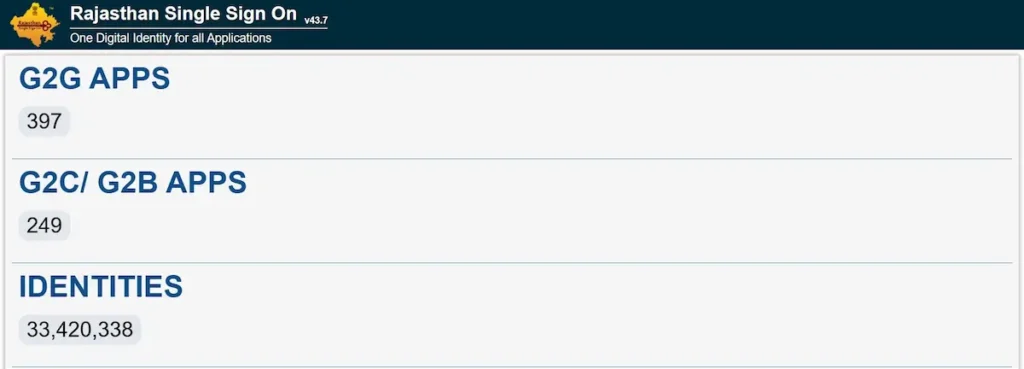
SSO ID क्या है? – What is SSO ID Rajasthan?
SSO ID is the Single Sign-On digital identity issued by the Government of Rajasthan through the Department of Information Technology and Communication (DoIT&C), launched in 2013, that lets citizens, businesses, and government employees access more than 100 state government services using a single username and password.
आसान भाषा में समझिए — पहले हर सरकारी काम के लिए अलग-अलग वेबसाइट, अलग ID, अलग पासवर्ड याद रखना पड़ता था। नौकरी के form के लिए एक login, बिजली बिल के लिए दूसरा, scholarship के लिए तीसरा। राजस्थान सरकार ने इसी झंझट को खत्म करने के लिए Rajasthan Single Sign-On (RajSSO) शुरू किया, जिसका official tagline है “One Digital Identity for all Applications”। एक ही SSOID और password से आप पोर्टल के सभी जुड़े हुए विभागों में login कर सकते हैं।
यह सेवा तीन तरह के users के लिए बनी है — आम नागरिक (Citizen), उद्योग या business owner (Udyog), और सरकारी कर्मचारी (Government Employee) — और आज भी DoIT&C द्वारा सक्रिय रूप से maintain की जा रही है, जिसका current version v33.6 है। RajSSO को इसकी digital governance पहल के लिए SKOCH Award भी मिल चुका है।
SSO ID Rajasthan – Quick Facts Table
| Field | Detail |
|---|---|
| Portal Name | Rajasthan Single Sign-On (RajSSO) |
| Tagline | One Digital Identity for all Applications |
| Launched By | Department of Information Technology & Communication (DoIT&C), Government of Rajasthan |
| Launch Year | 2013 |
| Official Website | sso.rajasthan.gov.in |
| Login URL | sso.rajasthan.gov.in/signin |
| Registration URL | sso.rajasthan.gov.in/register |
| Forgot SSO ID URL | sso.rajasthan.gov.in/forgotsd |
| Forgot Password URL | sso.rajasthan.gov.in/forgot |
| User Categories | Citizen, Udyog, Government Employee |
| Verification Methods | Jan Aadhaar, Google Account (Citizen/Udyog) · SIPF Number (Govt. Employee) |
| Total Services | 100+ state government applications |
| Helpdesk Phone | 0141-5123717, 0141-5153222 |
| Helpdesk Email | [email protected] |
| Helpdesk Hours | Monday to Friday, 9:30 AM – 6:00 PM IST |
| Mobile App | SSO Raj – Single Sign On (RGHS) on Google Play |
| Recognition | SKOCH Award |
| Languages | English, हिन्दी |
The RajSSO portal is actively maintained by DoIT&C and updated through versioned releases. Every detail in this table was cross-checked against the live portal at sso.rajasthan.gov.in in May 2026. If you spot a mismatch with the official site, the official site is always the source of truth.
Who Can Create an SSO ID? – Eligibility & User Categories
The Rajasthan SSO portal is open to three distinct types of users, and the registration path is different for each. Picking the wrong category at signup is the single most common reason people end up with two accounts they later have to merge, so it’s worth getting this right the first time. Here’s who fits where, and what you’ll need to verify your identity.
1. Citizen (नागरिक)
Anyone permanently residing in Rajasthan can register as a Citizen. Verification is done through your Jan Aadhaar card (recommended, since it unlocks most state benefits) or a Google account if you don’t have a Jan Aadhaar yet. Jan Aadhaar replaced the older Bhamashah card as Rajasthan’s primary family ID and is now the standard route to benefits like Chiranjeevi health insurance and DBT pensions.
2. Udyog – Business / Industry (उद्योग)
Business owners, traders, and industry operators registered in Rajasthan fall under the Udyog category. Verification is done through your Business Registration Number (BRN) or Udyog Aadhaar Number (UAN). This account type is what you use to reach the GST portal, business licensing applications, and state investment schemes like RIPS.
3. Government Employee (सरकारी कर्मचारी)
Rajasthan state government employees register through a separate path, using their SIPF (State Insurance and Provident Fund) number, which authenticates them against the official state employee database. Once verified, this account unlocks Raj Kaj — the internal ERP used for file movement, leave applications, and APAR (Annual Performance Appraisal Reports) — along with payslip portals and other internal government applications. Government employees should always use their SIPF credentials here, not a personal Citizen account.
SSO ID Registration Process – Step-by-Step Guide
SSO ID registration is free and takes about 5 minutes. You’ll need a valid mobile number that’s linked to your Jan Aadhaar (for citizens) or your SIPF login (for government employees). Here’s how to register from your phone or computer.
SSO ID Registration for Citizens (Jan Aadhaar Method)
- Open sso.rajasthan.gov.in/register in your mobile or desktop browser.
- Two tabs appear at the top of the form: “Citizen/Udhyog” and “Govt. Employee”. Tap Citizen/Udhyog — it’s selected by default for new users.
- The page now shows the registration options. Tap the Jan Aadhaar icon (the orange logo with the Jan Aadhaar mark on it).
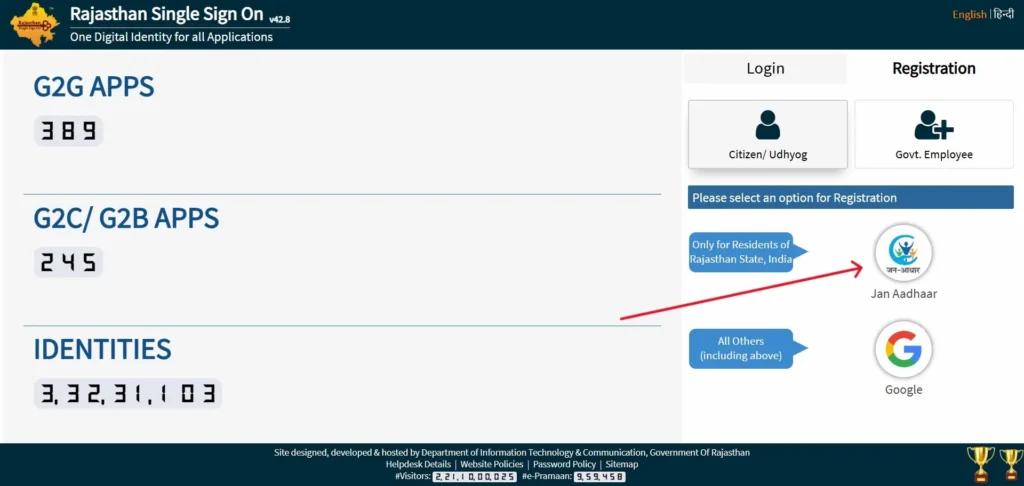
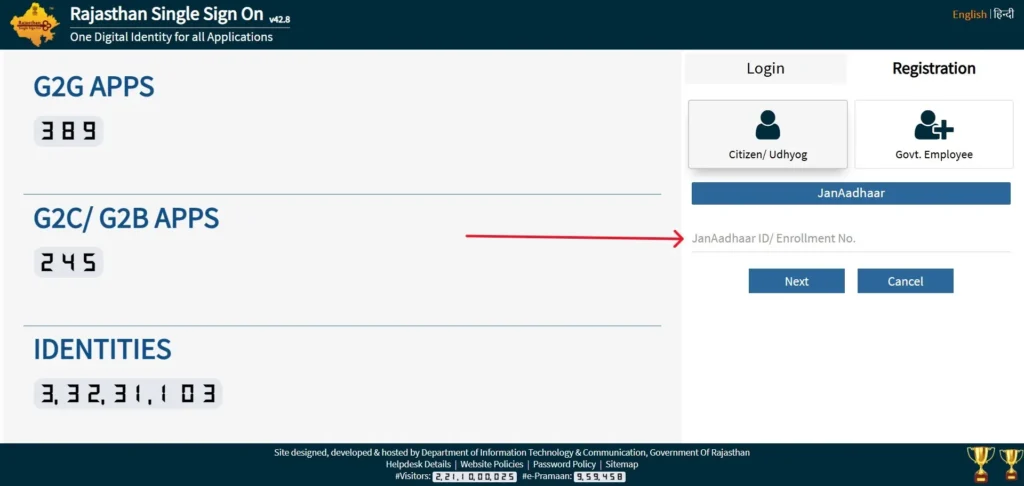
- Enter your Jan Aadhaar Enrollment ID or your Jan Aadhaar Card Number in the field provided.
- The system pulls up your family details from the Jan Aadhaar database. Pick your name from the family member list. If your mobile number isn’t updated in Jan Aadhaar, the portal will ask: “Do you want to receive OTP on Head of Family’s mobile?” — tap Yes if that’s your only option.
- An OTP is sent to the registered mobile. Enter the 6-digit code and tap Verify.
- The portal generates your SSOID (Digital Identity / Username). Set a strong password that meets the on-screen password policy.
- Registration is done. You can now login at sso.rajasthan.gov.in/signin with your new SSOID.
SSO ID Registration for Udyog (Business)
Business owners use the same Citizen/Udhyog tab, but choose the Udyog path inside it. You’ll need your Business Registration Number (BRN) or Udyog Aadhaar Number (UAN) to verify. Some business categories ask for extra documents at signup, and that list has been updated more than once — check the live registration page for the current requirements before you start.
SSO ID Registration for Government Employees
On the registration page, tap the “Govt. Employee” tab (not Citizen/Udhyog). Select SIPF as the registration method. Enter your SIPF number and SIPF password — the same credentials you use to login to the State Insurance and Provident Fund portal. The system checks you against the state employee database, generates your Government Employee SSO ID, and links it to your service profile. After registration, you’ll have access to Raj Kaj, employee payslip portals, and other internal government applications.
Tip — SSO ID registration is free. The Rajasthan government does not charge any fee to create an SSO ID. If anyone — agent, eMitra operator, or website — asks you to pay for SSO ID creation itself, it’s a scam. Report it to the SSO helpdesk numbers listed lower on this page.
How to Login to SSO ID Rajasthan Portal
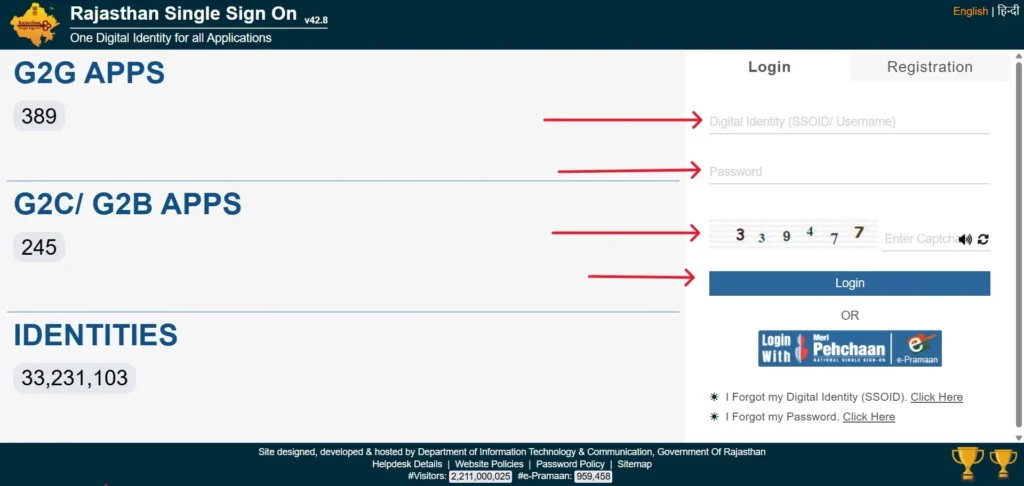
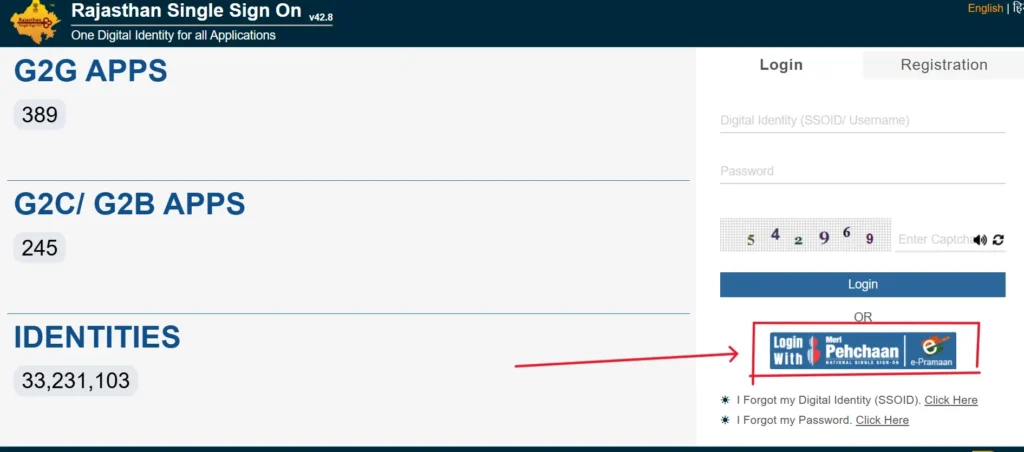
- Open sso.rajasthan.gov.in/signin in any browser. The page header reads “Rajasthan Single Sign On” with the current version number shown next to it.
- In the first field — labeled “Digital Identity (SSOID/Username)” — enter your SSO ID. The portal calls this field “Digital Identity,” not “username,” so don’t get thrown off if you were expecting the standard label.
- In the Password field, enter your password. Passwords are case-sensitive, so check your caps lock.
- Enter the 6-digit Captcha code from the image shown next to the field. If the characters are unclear, click the refresh icon next to the captcha to generate a new one.
- Click the Login button.
- On successful login, you land on your SSO Dashboard, where all 100+ services are arranged as clickable icons grouped by category.
Alternative: Login with Meri Pehchaan / e-Pramaan
The signin page also shows a Meri Pehchaan icon below the regular login form. This lets you login through India’s national e-Pramaan identity instead of your SSO ID — useful if you already have an e-Pramaan account from another central government service. You won’t need to create a separate Rajasthan SSO ID to use it.
If Login Fails
- Wrong password → wait 30 seconds before retrying, then use the Forgot Password link.
- Captcha rejected → click the refresh icon, then re-enter the new code.
- Site not loading → the portal has a daily maintenance window, usually around 1 PM – 2 PM IST.
- Account locked → contact the SSO helpdesk numbers listed lower on this page.
Forgot Your SSO ID or Password? Recovery Guide
Two different problems, two different recovery flows. The portal handles them separately, so it helps to know which one you actually need before you start.
I Forgot My SSO ID (Username Recovery)
If you’ve forgotten your SSOID itself — not the password, the username — the portal has a dedicated recovery flow at sso.rajasthan.gov.in/forgotsd (note the sd at the end of the URL). On the signin page, the link is labeled “I Forgot my Digital Identity (SSOID). Click Here”. Open that link, choose how you want to recover — by your registered mobile number or registered email — enter the value, request the OTP, and verify it. The portal then displays your SSOID on screen. One thing worth knowing: this flow only returns your username. The portal will never email or SMS you a password. If you’ve also forgotten your password, run the password reset separately.
I Forgot My Password (Password Reset)
For a forgotten password, use the “I Forgot my Password. Click Here” link on the signin page, which goes to sso.rajasthan.gov.in/forgot. Enter your SSOID, pick a reset method (mobile OTP, email OTP, or Aadhaar verification), receive and enter the OTP, then set a new password. The portal’s password policy requires at least 8 characters with a mix of upper and lower case, a number, and a special character — full policy is at /passwordpolicy.
OTP not arriving? The most common cause is an outdated mobile number linked to your Jan Aadhaar. Contact the helpdesk or visit your nearest eMitra kiosk to update the linked mobile number first.
Services Available on SSO Portal Rajasthan (100+ Apps)
The official portal sorts its applications into three categories — G2C (Government-to-Citizen), G2B (Government-to-Business), and G2G (Government-to-Government). Here’s what each category covers and the most-used services inside it.
G2C – Citizen Services (the largest category)
This is where most SSO ID users spend their time. The biggest service inside it is eMitra, the umbrella platform that runs more than 600 citizen services through 50,000+ physical kiosks across Rajasthan plus online access from your dashboard — bill payments, certificates (caste, domicile, income, birth, death), and application submissions all flow through it. Other major G2C services include the Jan Aadhaar Portal, the Jan Soochna Portal (RTI and public information), legacy Bhamashah-linked services, scholarship schemes, Mukhya Mantri Ayushman Arogya Yojana, Chiranjeevi Health Insurance, and electricity bill payments routed to JVVNL, AVVNL, and JdVVNL — Rajasthan’s three power discoms.
All Rajasthan government recruitment exams — including those run by RPSC (Rajasthan Public Service Commission) and RSMSSB (Rajasthan Staff Selection Board) — now require SSO ID login through the One-Time Registration (OTR) system.
G2B – Business & Industry Services
For businesses registered in Rajasthan, the dashboard opens routes to the GST Portal, Udyog Aadhaar and BRN-based registrations, RAJUDYOGMITRA (the state industry interface), the Rajasthan Investment Promotion Scheme (RIPS), Building Plan Approval System (BPAS), arms license applications, and routine compliance filings. Most of these were previously scattered across separate portals — the SSO dashboard now puts them behind a single login.
G2G – Government & Employee Services
State employees use this category to reach Raj Kaj (the file-movement and APAR ERP), SIPF and IFMS-RajSSP (financial management and pensions), RAJ-eVault (document storage), RAJ-eSign (digital signatures), RajMail (the official government email service), and Attendance MIS for daily attendance tracking. These applications are not visible to citizen accounts.
The full updated list of all 100+ applications is visible on your SSO Dashboard after login. Service additions and removals happen periodically, so the dashboard view is always the most current.
One-Time Registration (OTR) – Apply for Government Jobs & Download Admit Cards
Since 2024, every Rajasthan government recruitment application — RPSC, RSMSSB, REET, Police Constable — has to go through One-Time Registration (OTR), a system gated behind your SSO ID. OTR lets you fill your personal and qualification details once, then apply to multiple exams without re-entering data.
How OTR Works
After SSO login, open the State Recruitment Portal from your dashboard. Complete OTR by uploading your photo, signature, qualification certificates, and category certificate, pay the one-time category-based fee, and the system saves an OTR profile that auto-fills every future exam application — RPSC, RSMSSB, REET, and others — with the same details.
OTR Application Fees
The OTR fee is paid once per category, not per exam. After paying, you can apply to any number of subsequent recruitments without paying the OTR fee again (individual exam fees still apply).
| Category | OTR Fee |
|---|---|
| General / OBC Creamy Layer | ₹600 |
| OBC / MBC Non-Creamy Layer | ₹400 |
| SC / ST / PwD | ₹400 |
| Correction Charges (per correction) | ₹300 |
Fees as last verified in May 2026 from the official Rajasthan State Recruitment Portal. Always confirm the current fee on the official notification before paying.
Downloading Admit Cards
Admit cards (hall tickets) are downloaded from the same SSO dashboard. Login → State Recruitment Portal → Active Applications → Admit Card. The admit card is released 7–10 days before the exam date by the recruitment body (RPSC or RSMSSB). You don’t need a separate login for any of them — your SSO ID is the gateway to every active recruitment.
How to Merge Multiple SSO IDs Into One Account
If you’ve accidentally created two SSO IDs — one through Jan Aadhaar and one through Google, for example — the portal lets you merge them so all your services live under a single account. Here’s the official flow.
- Login to the SSO ID you want to keep (this is the active one — pick the one with more verified services attached).
- Open Profile Settings from the user menu in the top-right of the dashboard.
- Choose the Deactivate Account option. The label sounds counter-intuitive, but this is the official path the portal uses for merging.
- Enter your registered mobile number and request OTP.
- Verify the OTP.
- The system asks you to enter the SSOID you want to deactivate — the duplicate one you no longer need.
- Confirm the merge. The duplicate account is deactivated, and all its linked services are now accessible under the single retained SSO ID.
Heads up: Government Employee SSO IDs (created with SIPF) cannot be merged with Citizen accounts. The two are kept separate by design. If you have one of each, treat them as separate accounts.
SSO Raj Mobile App – Download for Android
The Rajasthan government publishes an official mobile app called SSO Raj – Single Sign On (RGHS), available on the Google Play Store. The app gives you the same access as the web portal — login to your dashboard, browse services, check application status, reach eMitra, and use RGHS health-scheme features — all from your phone. You sign in with the same SSO ID and password you use on sso.rajasthan.gov.in; there’s no separate mobile-only account.
RGHS in the app name refers to the Rajasthan Government Health Scheme, which is one of the major services integrated into the app for state employees and pensioners. Always download only from the official Play Store listing.
SSO ID Helpdesk – Official Contact & Support
If you run into a problem the recovery and troubleshooting steps above can’t fix, the official RajSSO helpdesk handles registration issues, login failures, account lockouts, and OTP problems.
| Field | Detail |
|---|---|
| Helpdesk Phone | 0141-5123717, 0141-5153222 |
| Helpdesk Email | [email protected] |
| Working Hours | Monday to Friday, 9:30 AM – 6:00 PM IST |
| Postal Address | Department of Information Technology & Communication, Yojana Bhawan, Tilak Marg, C-Scheme, Jaipur – 302005, Rajasthan |
| Official Website | sso.rajasthan.gov.in |
When you call or email, keep your SSOID, registered mobile number, and a screenshot of the error ready — it speeds up the response.
Frequently Asked Questions – SSO ID Rajasthan
SSO ID क्या है? / What is SSO ID?
SSO ID is the Single Sign-On digital identity issued by the Government of Rajasthan through DoIT&C. One SSOID gives access to 100+ state government services through one username and password.
Can I create an SSO ID without Jan Aadhaar?
Yes. Citizens without Jan Aadhaar can register using a Google account on the same registration page. Jan Aadhaar is recommended though, because it unlocks state benefits like Chiranjeevi health insurance and DBT pensions.
What is “SSO ID Login 118”?
Codes like 118 in SSO portal URLs or service redirects are internal department or service identifiers. If you’re stuck on such a screen, log out, clear your browser cache, log back in at sso.rajasthan.gov.in/signin, and retry the service. If it persists, contact the helpdesk with a screenshot.
What is the difference between SSO ID and Jan Aadhaar?
SSO ID is your login credential for the Rajasthan portal. Jan Aadhaar is your family identity, used to verify you during SSO registration and to claim state benefits inside the dashboard.
Is SSO ID Rajasthan available in Gujarat or other states?
No. SSO ID Rajasthan works only with Rajasthan state government services. Other states run their own digital identity systems — for example, Gujarat uses DigiGujarat. A Rajasthan SSO ID cannot be used outside Rajasthan.
Who Writes SSOIID.com
Uzma Iram writes and maintains every guide on this site. She works through each SSO Rajasthan process on the live portal herself before explaining it here, so the steps you read are the steps that actually appear on your screen. When the official portal changes, the matching guide is updated to match. Nothing on this site is anonymous — the person responsible for what you read is named, and you can reach her directly.