SSO ID Login Rajasthan 2026 — sso.rajasthan.gov.in
You’re on the login page and something isn’t working — or you want to do it right the first time. This guide walks you through the exact sign-in flow for the Rajasthan SSO portal issued by DoIT&C, and the fixes for the errors that actually show up.
The 30-Second Login
- Open sso.rajasthan.gov.in/signin
- Enter your SSOID (username)
- Enter your password
- Type the captcha shown on screen
- Click Login
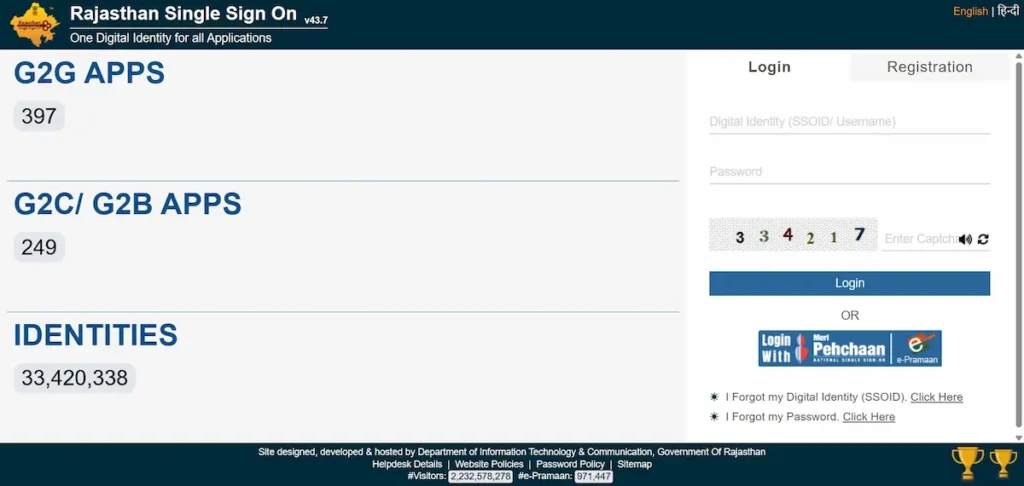
You’ll land on your dashboard, where linked services appear as tiles by category.
New user? Visit our SSO ID Registration page for the full step-by-step process.
What You Need Before You Log In
- Your registered SSOID (or a linked Jan Aadhaar / Google / DigiLocker account)
- Your password
- Your registered mobile with active network — OTP is sent here for verification
First-time visitor? Register first on the homepage instead of trying to log in.
Login Methods — Pick the One That Matches Your Account
- SSOID + password is the default route for everyone.
- Jan Aadhaar login works for citizen accounts created using Jan Aadhaar.
- Google login is available only to citizen accounts that registered through Google.
- DigiLocker signs you in if you’ve linked your DigiLocker identity.
- Meri Pehchaan (e-Pramaan) appears as a separate icon below the main form. Use it if you already have a central-government e-Pramaan account — no separate Rajasthan SSO ID needed.
Login for Government Employees (SIPF Flow)
State employees register and log in using their SIPF number. By default, the username is the Employee ID and the password is the date of birth in DDMMYYYY format. You’ll be asked to change the password on first login.
If SIPF rejects your credentials, the password reset is handled by SIPF — not SSO.
📞 SIPF helpdesk: 1800-180-6268 • ✉️ [email protected]
Login for Businesses (Udyog SSO)
Udyog accounts sign in with credentials linked to your BRN or Udyog Aadhaar. After login, the dashboard surfaces GST, RIPS, RajUdyogMitra, and JDA building-plan approvals — anything tied to your registered firm.
Fix Login Errors — A Diagnostic by Symptom
“Invalid Username or Password”
Check capslock and trailing spaces — passwords are case-sensitive. If you’re sure the password is right but you’re not sure of the username, use Forgot SSO ID (different from Forgot Password — see below).
OTP Not Received
Wait 2–3 minutes before requesting a new code. Confirm your mobile has signal and that DND isn’t blocking transactional SMS. After two failed requests, call the helpdesk.
Captcha Rejected
Click the refresh icon next to the captcha and retype the new code. If it keeps failing, switch to incognito mode or clear your browser cache.
Account Locked
Too many wrong attempts will lock the account for 30 minutes. Faster route: use Forgot Password to reset immediately and log in.
Portal Won’t Load or Runs Slow
The portal has a short daily maintenance window, usually around 1–2 PM IST. Peak congestion is 10 AM – 12 PM and 5–7 PM. For quickest access, log in before 9 AM or after 9 PM.
Session Expired Mid-Application
The portal logs you out after inactivity. Save drafts inside e-Mitra forms before stepping away, and avoid leaving the tab idle while filling long applications.
“User Already Exists” / Duplicate SSO ID
You should hold only one active SSOID. If duplicates exist, contact the helpdesk — they’ll merge or deactivate the extra one.
Forgot SSO ID vs Forgot Password — They’re Not the Same
- Forgot Password recovers access when you know your SSOID but not the password. OTP goes to your registered mobile or email.
- Forgot SSO ID recovers the username itself through the dedicated sso.rajasthan.gov.in/forgotsd flow, verified via Jan Aadhaar or registered mobile.
Most users mix these up. If your login is failing, identify which one you actually need before starting recovery.
Security Habits That Protect Your Login
Never share your OTP, even with someone claiming to be from the helpdesk — DoIT&C will never ask for it. Enable two-step verification inside your profile. Always log out from shared or public devices.
A legitimate URL ends in .rajasthan.gov.in. Anything ending in .in.net, .co.in, or a similar lookalike is a phishing clone — close the tab.
What You Can Do After Logging In
- Citizens: e-Mitra, Jan Aadhaar updates, scholarship applications, RPSC and RSSB job forms, RGHS, electricity bill, RTI requests.
- Businesses: GST portal, Udyog Aadhaar, RIPS, JDA approvals.
- Government employees: Raj Kaj, leave management, GPF, payslip downloads.
One login, 100+ linked services.
“SSO ID Login” Outside Rajasthan — Disambiguation
- Raj SSO / RJ SSO / Open SSO are just different ways users type the same Rajasthan portal. Same login URL.
- SSO ID Login Gujarat refers to a different system — Digital Gujarat — issued by the Gujarat Government. It’s not connected to Rajasthan SSO.
- SSO BPJS Ketenagakerjaan is Indonesia’s labour-insurance single sign-on, unrelated to anything in India.
If you landed here looking for Gujarat or Indonesia, you’re on the wrong portal.
SSO Helpdesk — When Self-Fix Doesn’t Work
| Channel | Detail |
|---|---|
| Phone | 0141-5123717, 0141-5153222 |
| Toll-free | 1800-180-6565 |
| [email protected] | |
| SIPF (employees) | 1800-180-6268 |
| General e-Governance | 181 |
When you email, include your SSOID and the exact error text — it cuts resolution time noticeably.